> ## Documentation Index
> Fetch the complete documentation index at: https://docs.elemente.ai/llms.txt
> Use this file to discover all available pages before exploring further.
# Dashboard
> A comprehensive guide to navigating and understanding the dashboard, including features for agent management, analytics, and workflow configuration.
## Overview
The dashboard is your central hub for managing AI agents, monitoring interactions, and configuring workflows. It provides a seamless interface to set up agents, analyze performance, and enhance customer support through customizable features and integrations.
 ## Features
### 1. Agent Setup and Customization
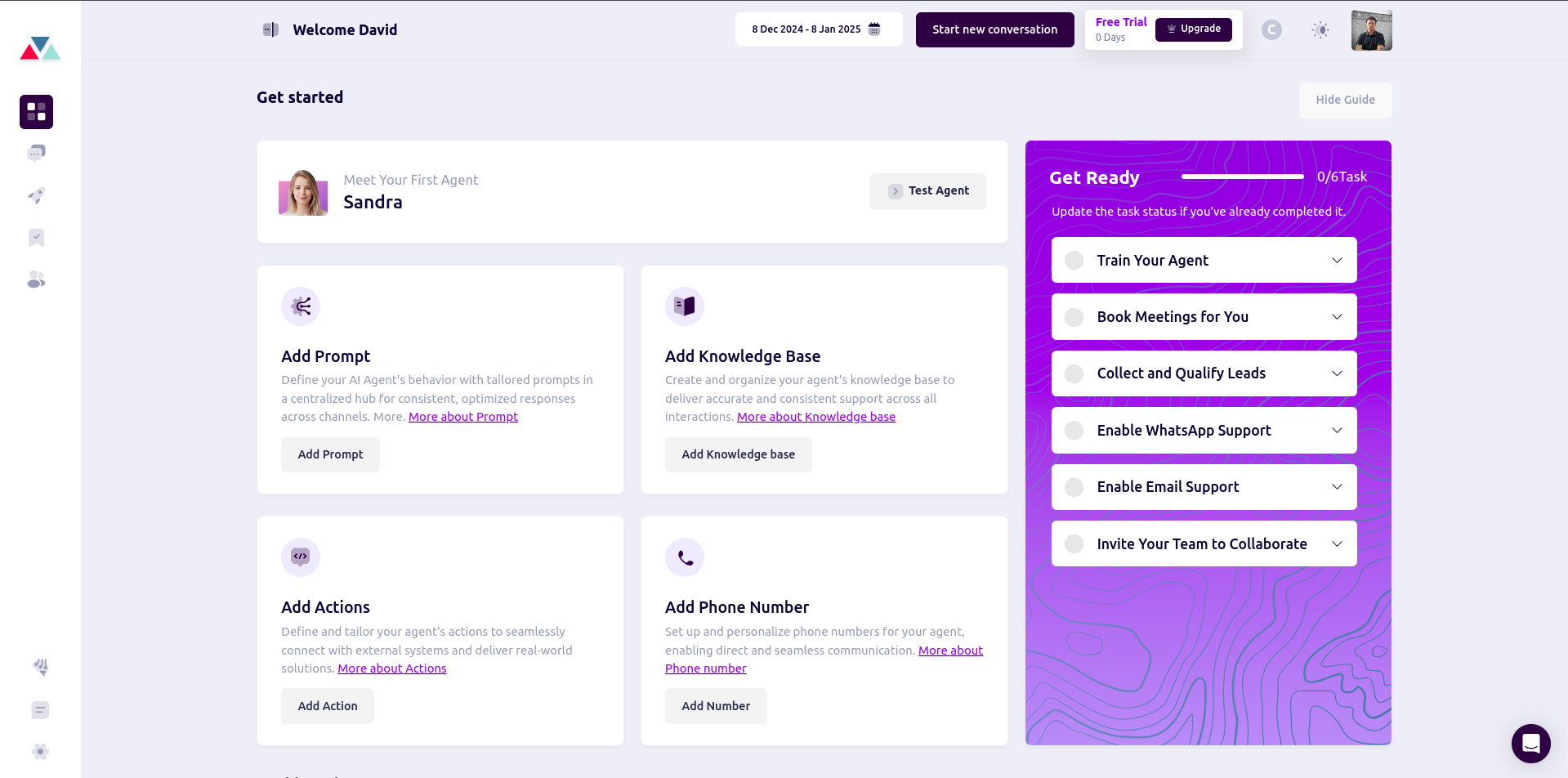
From the **Get Started** section, you can perform the following:
* **Add Prompt**: Define tailored prompts to shape your AI agent's behavior and responses.
* **Add Knowledge Base**: Centralize information to ensure consistent and accurate responses.
* **Add Actions**: Configure workflows that integrate with external systems for enhanced operations.
* **Add Phone Number**: Set up personalized phone numbers for direct communication.
#### Steps to Configure Agent Features
**1. Add Prompt**
* Navigate to the **Add Prompt** card and click **Add Prompt**.
* Enter the prompts and save the configuration.
**2. Add Knowledge Base**
* Click on the **Add Knowledge Base** card to start.
* Upload or link existing knowledge base articles to enhance agent responses.
**3. Add Actions**
* Select the **Add Actions** card to define workflows or integrate APIs.
* Configure custom or automated actions to streamline operations.
### 2. Task Management
The **Get Ready** section (right panel) provides a checklist of tasks to set up and optimize your agent’s functionality:
* **Train Your Agent**: Teach the agent key workflows and behavior patterns.
* **Book Meetings for You**: Enable calendar integrations for automated scheduling.
* **Collect and Qualify Leads**: Set up workflows to gather and assess lead information.
* **Enable WhatsApp Support**: Configure WhatsApp for customer communication.
* **Enable Email Support**: Integrate email for multi-channel support.
* **Invite Your Team to Collaborate**: Share agent configurations with your team for better management.
***
## Analytics
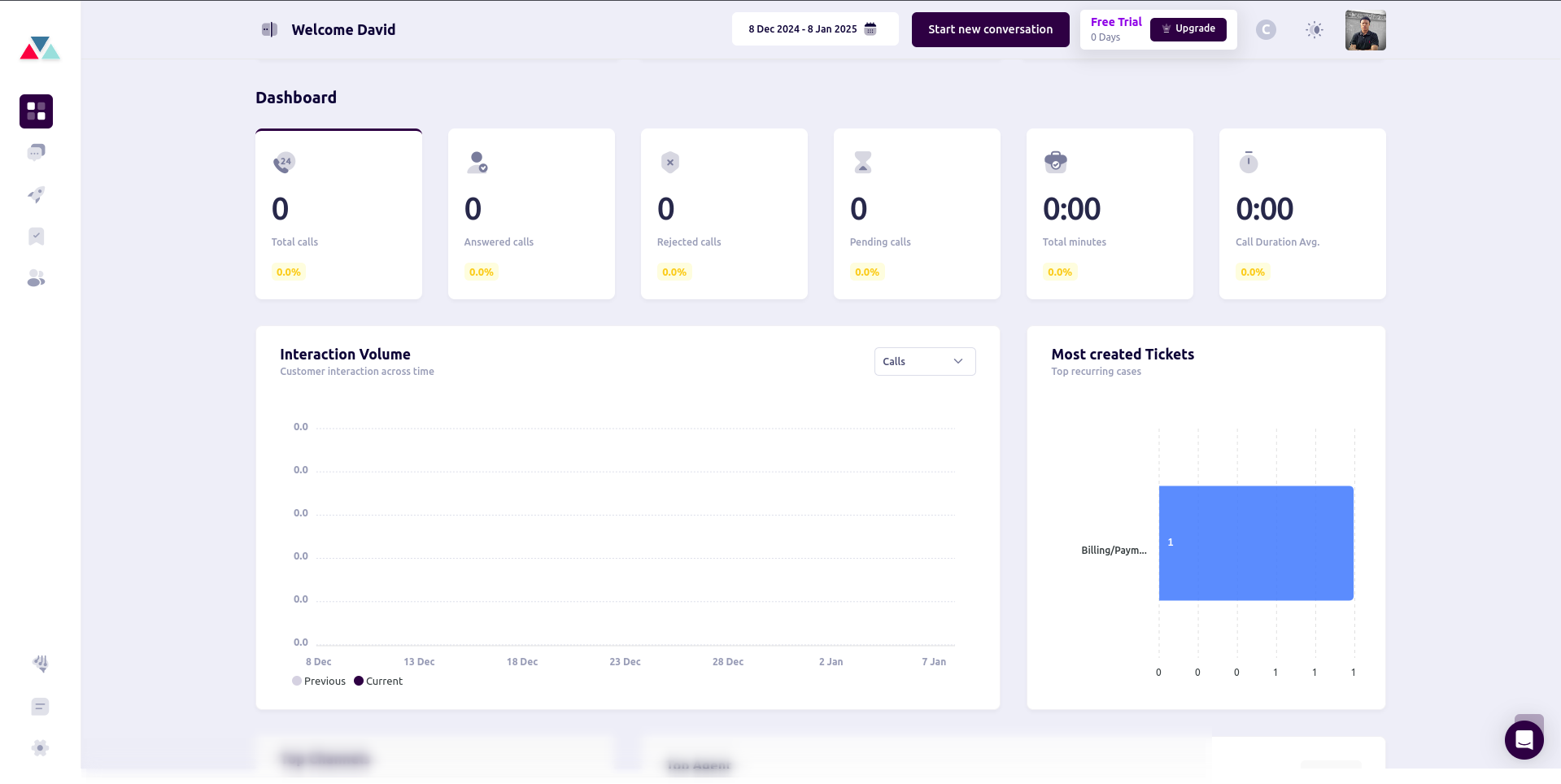
The analytics section provides insights into agent performance and customer interactions.
### 1. Interaction Volume
Monitor the volume of customer interactions across various channels (Calls, WhatsApp, SMS, etc.) over time.
## Features
### 1. Agent Setup and Customization
From the **Get Started** section, you can perform the following:
* **Add Prompt**: Define tailored prompts to shape your AI agent's behavior and responses.
* **Add Knowledge Base**: Centralize information to ensure consistent and accurate responses.
* **Add Actions**: Configure workflows that integrate with external systems for enhanced operations.
* **Add Phone Number**: Set up personalized phone numbers for direct communication.
#### Steps to Configure Agent Features
**1. Add Prompt**
* Navigate to the **Add Prompt** card and click **Add Prompt**.
* Enter the prompts and save the configuration.
**2. Add Knowledge Base**
* Click on the **Add Knowledge Base** card to start.
* Upload or link existing knowledge base articles to enhance agent responses.
**3. Add Actions**
* Select the **Add Actions** card to define workflows or integrate APIs.
* Configure custom or automated actions to streamline operations.
### 2. Task Management
The **Get Ready** section (right panel) provides a checklist of tasks to set up and optimize your agent’s functionality:
* **Train Your Agent**: Teach the agent key workflows and behavior patterns.
* **Book Meetings for You**: Enable calendar integrations for automated scheduling.
* **Collect and Qualify Leads**: Set up workflows to gather and assess lead information.
* **Enable WhatsApp Support**: Configure WhatsApp for customer communication.
* **Enable Email Support**: Integrate email for multi-channel support.
* **Invite Your Team to Collaborate**: Share agent configurations with your team for better management.
***
## Analytics
The analytics section provides insights into agent performance and customer interactions.
### 1. Interaction Volume
Monitor the volume of customer interactions across various channels (Calls, WhatsApp, SMS, etc.) over time.
 ### 2. Most Created Tickets
View a breakdown of the most frequently created tickets (e.g., Billing/Payment issues) to identify common customer concerns.
### 3. Top Channels
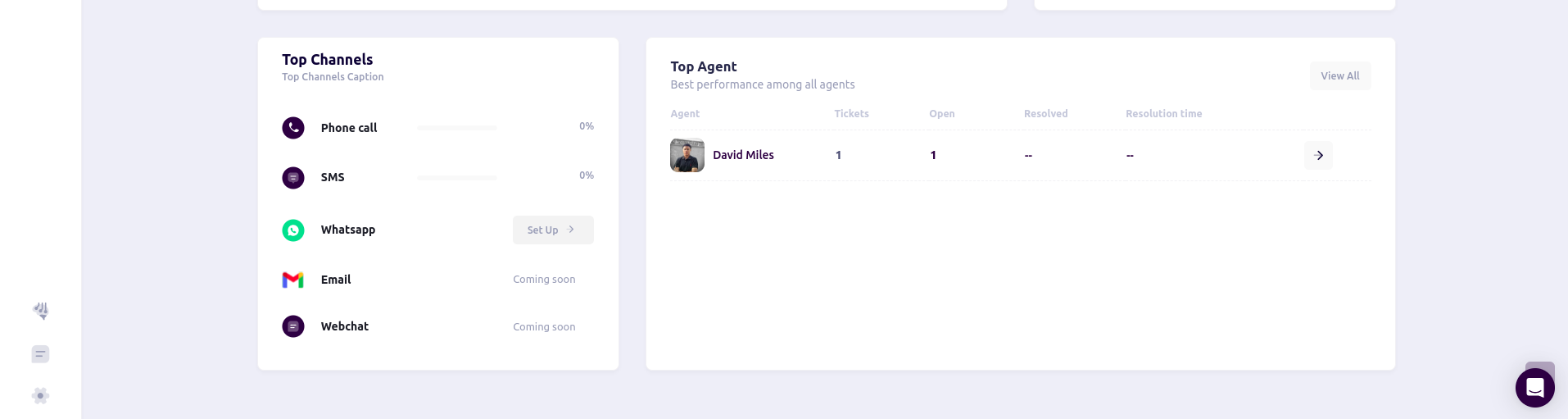
Analyze the percentage of interactions across different communication channels, such as:
* Phone Calls
* SMS
* WhatsApp
* Email
### 4. Top Agent Performance
Identify the top-performing agents based on metrics like:
* Total Tickets Handled
* Open Tickets
* Resolution Time
### 2. Most Created Tickets
View a breakdown of the most frequently created tickets (e.g., Billing/Payment issues) to identify common customer concerns.
### 3. Top Channels
Analyze the percentage of interactions across different communication channels, such as:
* Phone Calls
* SMS
* WhatsApp
* Email
### 4. Top Agent Performance
Identify the top-performing agents based on metrics like:
* Total Tickets Handled
* Open Tickets
* Resolution Time
 ***
## Benefits of Using the Dashboard
**1. Centralized Management**: Access all agent settings and analytics from one interface.
**2. Streamlined Workflows**: Configure actions, prompts, and knowledge bases to enhance productivity.
**3. Data-Driven Insights**: Leverage analytics to optimize agent performance and customer satisfaction.
**4. Multi-Channel Support**: Integrate various communication channels for better customer reach.
***
## Benefits of Using the Dashboard
**1. Centralized Management**: Access all agent settings and analytics from one interface.
**2. Streamlined Workflows**: Configure actions, prompts, and knowledge bases to enhance productivity.
**3. Data-Driven Insights**: Leverage analytics to optimize agent performance and customer satisfaction.
**4. Multi-Channel Support**: Integrate various communication channels for better customer reach.